Egress rules
Egress rules change which hosts a project’s sandboxes can reach, on top of their egress bundle. Allow a host the agent needs, or deny one it should not reach, once for the whole project. Anyone in the project can add, change and delete its rules. You set them in the console; the CLI has no command or flag for them, and --policy-bundle picks only the bundle.
Allow a host the agent was blocked from
Section titled “Allow a host the agent was blocked from”-
In the console, open the sandbox and select the Network tab. It lists the hosts the egress policy blocked. A block appears there about 10 to 20 seconds after it happens. Inside the sandbox, a block looks like a connection reset or a timeout, with no message about the policy (See what was blocked).
-
On the host’s row, click Allow
api.example.comto allow that name, or Allow*.example.comto allow every name in its domain. The second button is missing when the host is the domain itself, or when the domain is shared by many owners, such asgithub.io. -
The tab says that the host is allowed, and what the save did for running sandboxes (see When a change applies). If a deny rule in the project covers the host, it says so instead, and nothing is saved.
The list is a history, so a host stays on it after it is allowed. A row that a project rule already covers names that rule instead of the buttons: Allowed by rule for an allow rule, or Denied by rule for a deny rule, which wins. The rule links to the Egress page.
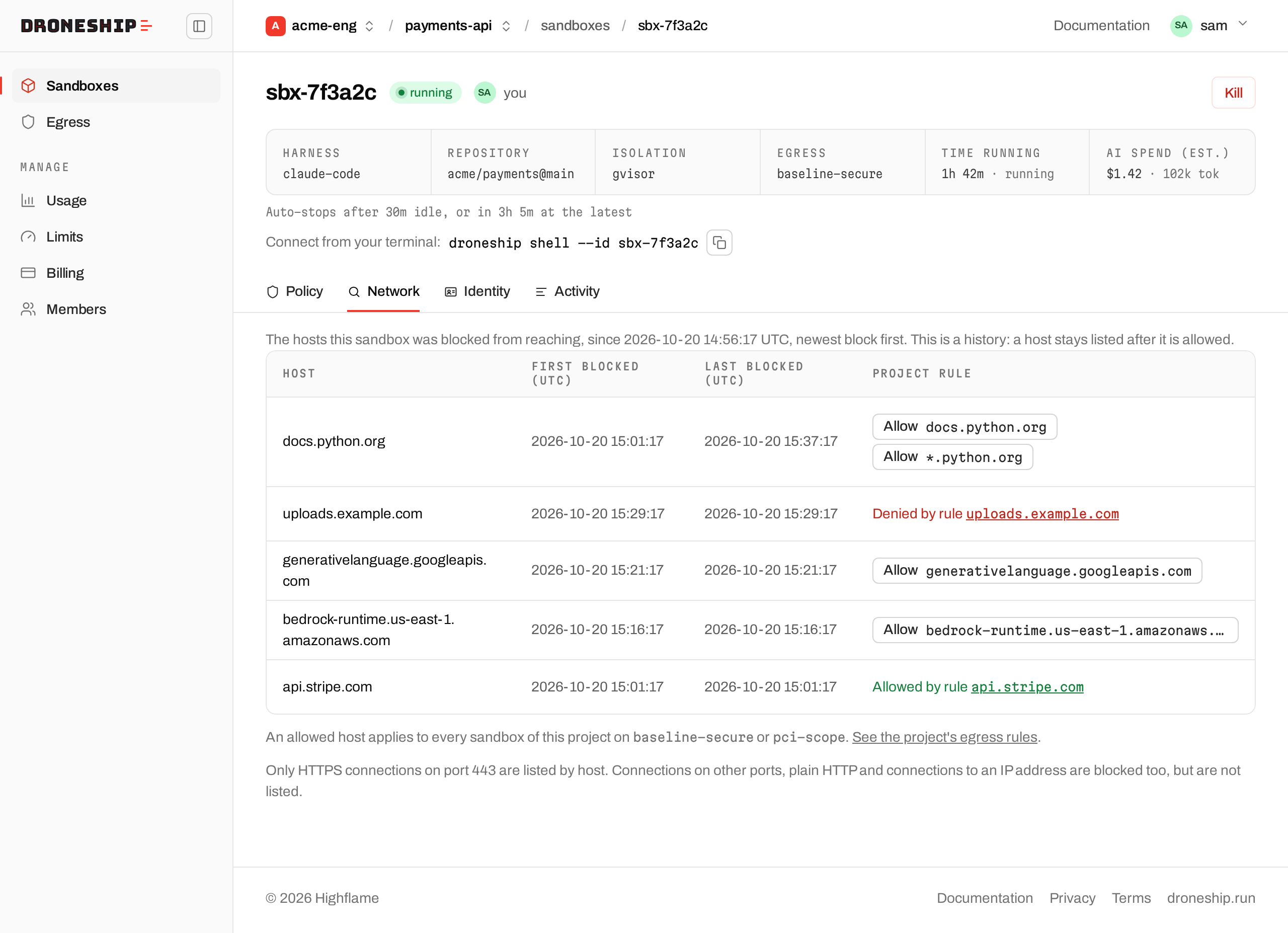
The Egress page has the same buttons on its Blocked in this project list, which shows the hosts blocked in all of the project’s sandboxes. An ended sandbox’s Network tab has them too: the rule then applies to the project’s next launches.
On a running sandbox, the buttons are only there when the project’s rules apply to it: on baseline-secure or pci-scope. A running sandbox on open-dev, or one launched with its own host list, says that the rules do not apply to it. The console does not keep an ended sandbox’s bundle, so its Network tab always has the buttons. A rule you add there applies to the project’s next launches on baseline-secure or pci-scope, whatever bundle the ended sandbox had.
Add a rule
Section titled “Add a rule”-
In the console, select Egress in the left sidebar.
-
Under Add a rule, enter the host, pick Allow or Deny, and add a comment if you want one.
-
Click Add rule. The page reloads with the rule in the table and says what the save did.
Use Deny to take a host off the bundle’s list, for example registry.npmjs.org when the team installs only from an internal mirror.
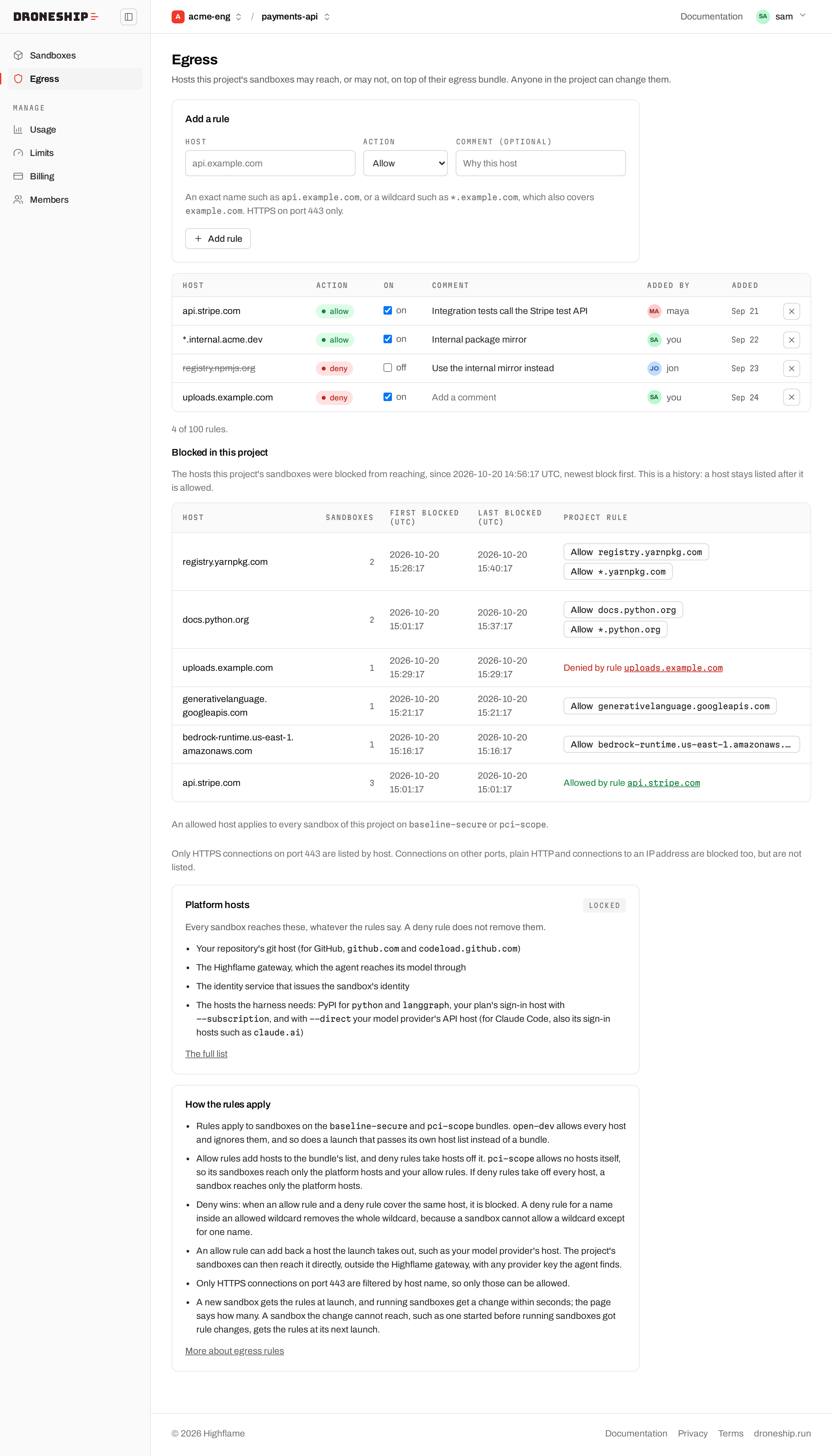
The table lists each rule with its host, action, an on/off switch, comment, who added it and when. Turn a rule off to keep it without applying it. Click a comment to edit it in place (Enter saves, Escape cancels), and click × to delete the rule. Adding a rule that is already there but off turns it on.
A rule that is on but does nothing says No effect and why, for example when a deny rule cancels it.
A project can have up to 100 rules, and a comment up to 200 characters. If a save says the rules are too large, shorten some comments or delete a rule.
Host names
Section titled “Host names”| You enter | Covers |
|---|---|
api.example.com |
That name only |
*.example.com |
Every name in example.com, and example.com itself |
These are refused:
*on its own, and a wildcard over a domain that many owners share. That is any domain on the Public Suffix List, such as*.com,*.co.uk,*.github.ioor*.blob.core.windows.net, and any domain with such a shared domain below it, such as*.amazonaws.com. Name your own domain instead, such as*.mybucket.s3.amazonaws.com.- IP addresses and address ranges
- Ports, schemes such as
https://, and paths - Names that are not valid international domain names, such as ones with symbols or emoji. Names in right-to-left scripts, such as Arabic or Hebrew, cannot be used in a rule yet.
Names are not case-sensitive. An international name is stored in its ASCII form, so bücher.de becomes xn--bcher-kva.de.
Only HTTPS connections on port 443 are filtered by host name, so only those can be allowed. Connections on other ports, plain HTTP, and connections to an IP address stay blocked.
How rules combine with the bundle
Section titled “How rules combine with the bundle”- Rules apply to sandboxes on
baseline-secureandpci-scope.open-devallows every host and ignores them. - An allow rule adds its host to the bundle’s list. A deny rule takes its host off the list.
- Deny wins. When an allow rule and a deny rule cover the same host, the host is blocked. The console refuses an allow rule that a deny rule that is on would cancel, and names the deny rule.
- A deny inside an allowed wildcard removes the whole wildcard. A sandbox cannot allow
*.example.comexcept for one name, so a deny rule foruploads.example.comtakes all of*.example.comoff the list. The console asks before it saves such a rule. To allow most of a domain but not one name, allow the names you need one by one. - An allow rule can add back a host that the launch takes out. That includes your model provider’s host, such as
api.anthropic.com, which a launch through the Highflame gateway leaves off the list, and on a Claude Code launch the gateway host, which only the credential sidecar reaches. With such a rule, the project’s sandboxes can reach that host directly: an agent that finds a provider key can call the provider with it, and those calls do not go through the gateway. Add one only if the project needs it. pci-scopeallows no hosts of its own, so its sandboxes reach the platform hosts and your allow rules.- If deny rules take off every host of the bundle, a sandbox reaches only the platform hosts.
- A launch through the API that sends its own host list instead of a bundle ignores the rules. Every
droneship runuses a bundle.
Platform hosts
Section titled “Platform hosts”Every sandbox reaches the hosts its launch needs, whatever the rules say. A deny rule does not remove them:
- your repository’s git host (for GitHub,
github.comandcodeload.github.com) - the Highflame gateway, which the agent reaches its model through
- the identity service that issues the sandbox’s identity
- the hosts the harness needs to run, such as your model provider’s API host on a
--directlaunch
The Egress page shows them as Locked. How the allowlist is built lists them all.
When a change applies
Section titled “When a change applies”- New sandboxes get the project’s rules at launch.
- Running sandboxes get a change within seconds, and the console says how many it reached. If the console could not get an answer in time, it says that running sandboxes get the change within a minute.
- A sandbox the change could not reach, such as one started before running sandboxes got rule changes, gets the rules at its next launch. The console counts these separately.
- A restored task keeps its bundle and gets the project’s rules as they are when you restore it, not as they were when it ran.
Turning a rule off, turning it on and deleting it apply the same way. A sandbox’s Policy tab shows its list as it was at launch, so it does not show a change that reached the sandbox later.
Troubleshooting
Section titled “Troubleshooting”The host is still blocked after an Allow. Check, in this order:
- The connection is HTTPS on port 443. Plain HTTP, other ports and IP addresses stay blocked whatever the rules say.
- The save reached the sandbox. If it says a sandbox gets the rules at its next launch, stop that sandbox (
droneship kill <id>) and launch again. - No deny rule covers the host. A deny rule wins, and a deny inside an allowed wildcard removes the whole wildcard.
- The tool did not move on to another host. Many downloads redirect to a CDN host, which then shows as a new row in the Network tab. Allow that one too.
A block is not in the list yet. A block appears about 10 to 20 seconds after it happens. Reload the page.
A save says a sandbox gets the rules at its next launch. The sandbox could not be changed while it runs. It keeps the hosts it has until you launch it again; new sandboxes get the rules at launch.
The console asks before saving a deny rule. The host is inside an allowed wildcard, such as uploads.example.com inside *.example.com, and the deny rule would remove the whole wildcard. To keep the rest of the domain, cancel, and allow the names you need one by one instead of the wildcard.
The Network tab has no Allow buttons. The sandbox is on open-dev, or was launched with its own host list, so the project’s rules do not apply to it. Launch on baseline-secure or pci-scope.
- Egress: the bundles and how the final list is built.
- The console: the Egress page and the Network tab.
- Work as a team: projects and who is in them.