Quickstart
This page installs the CLI, signs you in, starts Claude Code on your repo in a cloud sandbox, and shows the sandbox in the console. You need macOS or Linux and a git checkout whose origin is on GitHub.
-
Install the CLI.
Terminal window curl -fsSL https://droneship.run/install | shThe installer puts
droneshipon your PATH, usually in~/.local/bin. If your shell then sayscommand not found, add the line the installer printed, or:Terminal window export PATH="$HOME/.local/bin:$PATH" -
Sign in.
Terminal window droneship loginThe CLI opens your browser. After you approve the sign-in there, the terminal prints:
Opening your browser to sign in.If it doesn't open, visit:https://...Signed in as you@example.com (profile: default)scopes: <scopes>account: <account-id>project: <project-id>control plane: https://api.highflame.aiOn a machine with no browser, such as a dev box over SSH, run
droneship login --headlessand approve the code it shows from any device. -
Push your branch, then start Claude Code from your repo.
Terminal window cd ~/src/my-repogit pushdroneship run claudeThe sandbox clones your repo’s
originat your current branch, so uncommitted work and unpushed commits are not in it. The CLI tells you when you have either.The agent’s model calls are paid with your own Claude Pro/Max plan or your own Anthropic API key. If you saved an API key on the console’s Settings page (under Model keys), the CLI says
Using your saved Anthropic keyand uses it. With no key sent and none saved, the CLI saysNo key sent: sign in to your Claude Pro/Max plan inside the sandbox, and you run/loginin Claude Code. A background task (-p) has nobody to sign in, so it uses your API key or aclaude setup-tokentoken (Hand off a task). To use an API key instead, export it and name it with--byok. The CLI remembers the name for later launches:Terminal window export ANTHROPIC_API_KEY=sk-ant-...droneship run claude --byok ANTHROPIC_API_KEYWith your key, the launch looks like this:
Repo: https://github.com/you/my-repo @ mainCreating Claude Code sandbox (terminal)...usually under a minute; longer the first time an image is builtcode at /workspace/my-repo @ <commit>isolation: KERNELClaude Code then opens in your terminal, running inside the sandbox. Give it a task as you would locally. It doesn’t ask before each command, because the sandbox is the boundary. Pass
--askto turn those prompts back on.If the repo is private and you haven’t connected GitHub yet, the CLI opens the GitHub authorization page in your browser and continues after you approve.
-
Find the sandbox in the console.
Open droneship.run/console. The Sandboxes page lists your sandbox with its harness (
claude-code), repository and branch, status, how long it has been running, and when it will auto-stop. From the terminal,droneship listshows the same sandboxes.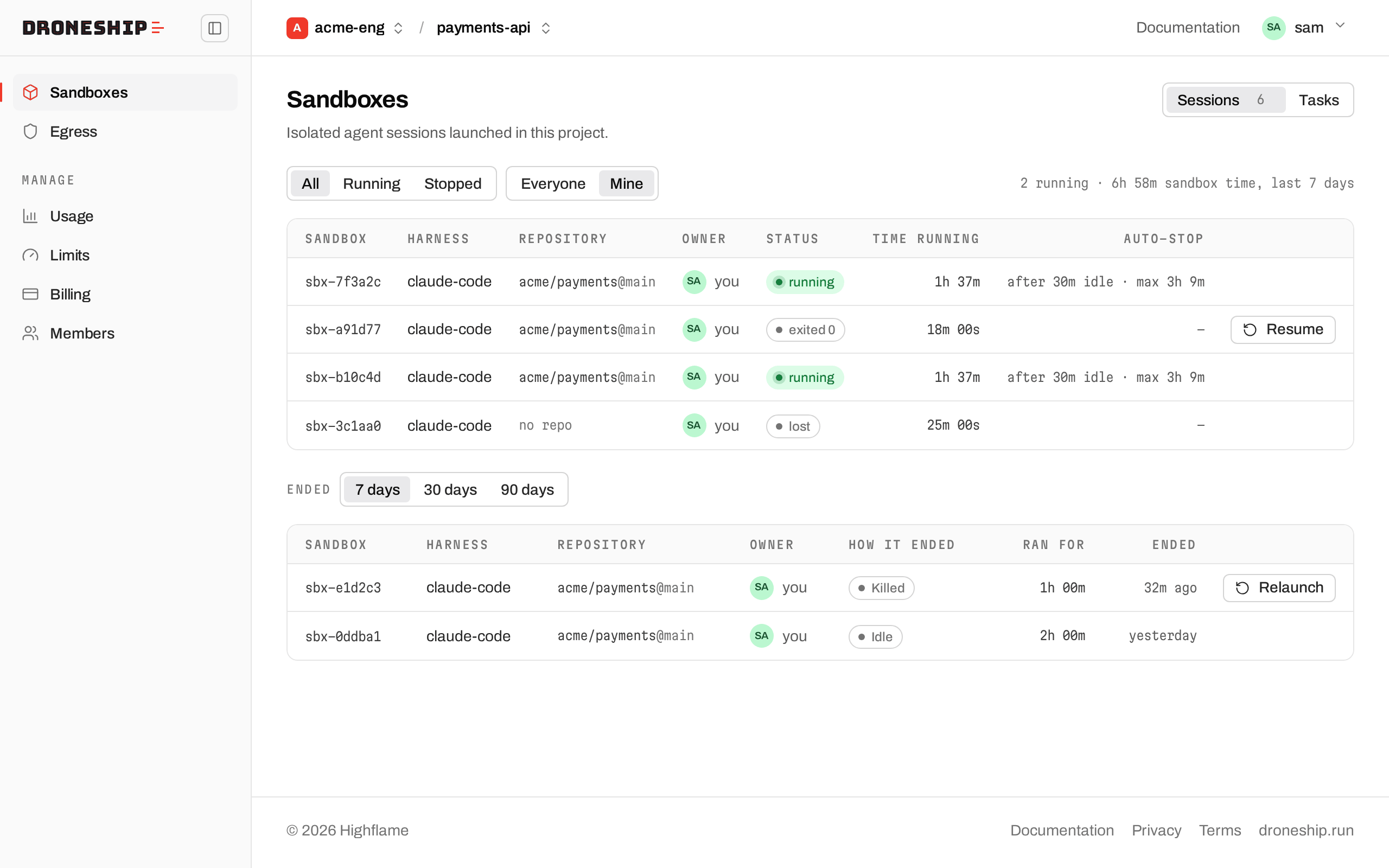
-
Stop the sandbox, or let it stop on its own.
Terminal window droneship kill <id>Terminated sandbox <id> (local SSH key discarded)droneship listshows the id. Killing it is optional: with nobody connected, the sandbox shuts down after 30 minutes idle, and it shuts down after 8 hours regardless. In both cases its workspace is saved, and the nextdroneship run claudeon this repo resumes from it.
What happened
Section titled “What happened”droneship run claude asked the hosted control plane for a sandbox, cloned your repo into it, and started Claude Code with the default egress policy (baseline-secure). Model calls go through the Highflame gateway. With --byok, your key stays in a sidecar outside the sandbox. Your laptop holds only your Droneship sign-in token, and no cloud credentials.
Running droneship run claude in the same repo reattaches to that sandbox instead of starting a new one. --new --ephemeral (or a -p prompt run) starts another alongside it. See Core concepts for what a sandbox, harness and workspace are, and droneship run for every option.
- Pair with an agent: work alongside Claude live, then review its branch.
- Hand off a task: give Claude a prompt and come back to the result.
- Review and land:
droneship diff,pullandpr.