Egress
You can leave a run unattended because the sandbox’s outbound traffic is limited to the hosts in its egress policy. Within those hosts, the agent runs commands without asking, installs packages and pushes to your repo.
droneship run claude # baseline-secure, the defaultdroneship run claude --policy-bundle open-dev # any hostdroneship run claude --policy-bundle pci-scope # only the hosts the launch needsThe policy is a named bundle plus your project’s egress rules. You pick the bundle, and the Droneship service defines what it allows. The project’s rules add hosts to the bundle’s list or take hosts off it. The hosts that every launch needs, the platform hosts, are always on the list and are locked: a rule cannot remove them.
The bundle is set when the sandbox starts. A restored task keeps its bundle, and every other launch uses the one you pass (or the default). Each launch, a restore included, uses the project’s rules as they are at that moment, and a running sandbox gets a rule change within seconds (When a change applies).
The bundles
Section titled “The bundles”| Bundle | Network | Lets the agent |
|---|---|---|
baseline-secure (default) |
An allowlist | Clone and push to GitHub, install from npm, PyPI, Go modules and crates.io, and call its model |
open-dev |
Any host | Reach anything, as your laptop would |
pci-scope |
Only the hosts the launch adds, and the project’s allow rules | Clone your repo and call its model |
baseline-secure
Section titled “baseline-secure”The hosts a coding agent uses day to day:
api.anthropic.comgithub.comapi.github.comcodeload.github.comobjects.githubusercontent.comrelease-assets.githubusercontent.comraw.githubusercontent.comregistry.npmjs.orgpypi.orgfiles.pythonhosted.orgproxy.golang.orgsum.golang.orgindex.crates.iostatic.crates.iocrates.ioInstalls from npm, PyPI, the Go module proxy and crates.io work without configuration, and so do GitHub release downloads and the GitHub API. A request to any other host fails. If the agent needs a host that isn’t here, add an allow rule for it to the project (Egress rules), or use open-dev for that run.
open-dev
Section titled “open-dev”No allowlist. The sandbox can reach any host, and the project’s egress rules do not apply. Use it when the task needs hosts you can’t list ahead of time, such as browsing docs sites. For a host you know, an allow rule keeps the rest of the policy in place.
pci-scope
Section titled “pci-scope”The bundle itself allows no hosts. The sandbox still reaches the hosts every launch adds (next section), so the agent can clone your repo and call its model. Package registries and other hosts are not on the list, so commit the dependencies it needs to the repo, or allow their hosts with egress rules.
How the allowlist is built
Section titled “How the allowlist is built”The final list in a sandbox is the bundle plus the hosts that launch needs, with the model provider’s hosts taken out, and then the project’s rules:
- Added (the platform hosts): the hosts the launch needs. They are added under every bundle,
pci-scopeincluded, so the agent can clone, start and reach its model:- your repo’s git host (for GitHub,
github.comandcodeload.github.com) - the Highflame gateway
- the identity service that issues the sandbox’s identity
- the hosts the harness needs to run: your plan’s sign-in host with
--subscription, and with--directyour model provider’s API host (for Claude Code, also its sign-in hosts such asclaude.ai)
- your repo’s git host (for GitHub,
- Taken out: the model provider’s own hosts, such as
api.anthropic.com, even thoughbaseline-securelists it. Model calls go through the Highflame gateway, so the agent reaches its model that way. (open-devhas no list to take it out of, but the agent is still pointed at the gateway.) A project’s allow rule for that host adds it back (see Project rules). - Claude Code: the gateway is reached through the credential sidecar, so it isn’t on the sandbox’s own list either.
- Project rules: under
baseline-secureandpci-scope, each allow rule adds its host and each deny rule takes its host off. A deny rule never removes the hosts under Added (the platform hosts). An empty list of rules changes nothing. If deny rules take off every bundle host, the sandbox reaches only the platform hosts. A launch through the API that sends its own host list instead of a bundle ignores the rules.- Deny wins over an allow rule for the same host, and a deny inside an allowed wildcard removes the whole wildcard: a sandbox cannot allow
*.example.comexcept foruploads.example.com. - An allow rule can add back a host taken out above: the model provider’s host, or on a Claude Code launch the gateway host. The project’s sandboxes can then reach it directly, so an agent that finds a provider key can call the provider with it, outside the gateway. Egress rules has the details.
- Deny wins over an allow rule for the same host, and a deny inside an allowed wildcard removes the whole wildcard: a sandbox cannot allow
With --direct and your own key (--byok), the gateway is skipped and the provider’s host for that key is opened for that sandbox only. Harnesses and models covers the billing options.
See the policy
Section titled “See the policy”In the console, open a sandbox. The header shows its egress bundle, and the Policy tab shows the policy the sandbox got at launch, in JSON. A rule change that reached the sandbox while it runs is not shown there:
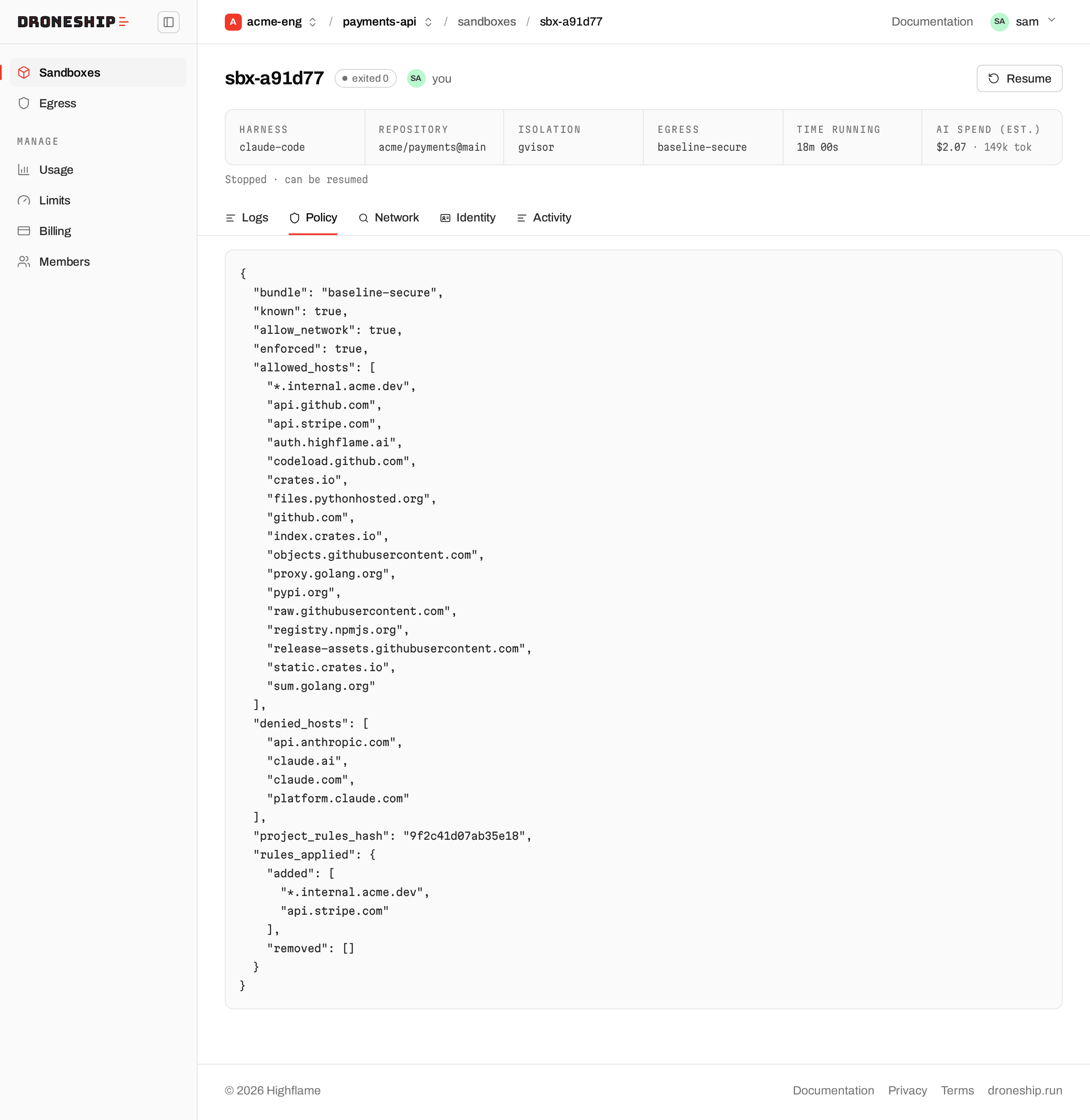
| Field | Means |
|---|---|
bundle |
The bundle you picked |
known |
Whether Droneship can state the policy. false only for an old sandbox it recovered without one, and the console shows unknown |
allow_network |
Whether the sandbox has any outbound network |
enforced |
true when a restriction applies. false means any host (open-dev) |
allowed_hosts |
The final allowlist at launch |
denied_hosts |
Hosts kept off the list whatever the bundle says, such as the model provider when calls go through the gateway. Empty with --direct. An allow rule can still add one back |
project_rules_hash |
A short id of the project’s rules the launch used. null when the project had no rules that are on, or the bundle ignores them |
rules_applied |
What those rules changed: added, the hosts allow rules added, and removed, the hosts deny rules took off (a wildcard a deny rule falls inside included) |
More: droneship run, The console.
See what was blocked
Section titled “See what was blocked”Under baseline-secure or pci-scope, a connection to a host that the policy does not allow fails. The failure has no message about the policy. An HTTPS connection fails during the TLS handshake (curl exits with code 35). A connection on another port times out.
To see which hosts were blocked, open a sandbox in the console and select the Network tab. Every sandbox in the project has the tab, running or ended, and anyone in the project can open it. It lists each host the sandbox was blocked from, with when it was first and last blocked, newest block first. To see the hosts blocked in all of the project’s sandboxes, open the Egress page: its Blocked in this project list also shows how many sandboxes were blocked from each host.
A block appears in the lists about 10 to 20 seconds after it happens. A sandbox’s Network tab covers the last 90 days, and the project’s list covers the last 30 days. The lists are a history: a host stays on them after a rule allows it. On a sandbox that the project’s rules apply to (baseline-secure or pci-scope), each row has buttons that allow the host, or its whole domain, for the project, or names the rule that already allows or denies it: see Egress rules.
The provider records these blocks outside the sandbox, so a line that the agent prints does not appear in the list. The list shows the hosts that the agent tried to reach, and the agent chooses those names. Check a host before you rely on it.
What the list does not show:
- Other ports, plain HTTP and IP addresses. The policy filters HTTPS connections on port 443 by host name. A connection on any other port, on plain HTTP, or to an IP address is also blocked, but it is not listed.
- Older blocks. Blocks older than 90 days on the Network tab, or older than 30 days in the project’s list, are not shown. When there are more blocks than one read takes, only the most recent are shown, and the list says so.
- Every repeat of a block. The provider records a host once, and again only after the sandbox’s hosts change. Last blocked is the most recent of those records, not the most recent connection.
open-devsandboxes. That bundle has no allowlist, so it blocks nothing.
DNS is not filtered. A lookup of a blocked host still succeeds, and the connection is what fails.
- Egress rules: allow or deny hosts for every sandbox in a project.
- Hand off a task: give the agent a task and leave.
- Tools and MCP: bring MCP servers with the repo’s
.mcp.json. - Isolation and identity: what keeps each sandbox apart.